 Password Recovery
 Hashcat is a password explosion artifact
Hashcat is a password cracking tool and an essential tool for information security. I am bookmarking this article to record and summarize it for future reference, and it may also help readers who read this article.
Introduction
Hashcat is the world's fastest password cracker and an open-source distributed tool that supports multiple platforms and algorithms.
Official: https://hashcat.net/hashcat/
Github:https://github.com/hashcat/hashcat
安装
Windows
https://github.com/hashcat/hashcat/releases 下载最新版压缩包,解压根据自己的平台运行 hashcat64.exe 或者 hashcat32.exe
常用参数
-m Crack hash Type
Specifies the hash type to be cracked, followed by the number corresponding to the hash type
-A Crack Mode
Specifies the crack mode to be used, and its value refers to the following parameters:
- [ Attack Modes ] -

  # | Mode
 ===+======
  0 | Straight                # Direct dictionary cracking
  1 | Combination             # Combination cracking
  3 | Brute-force             # mask Brute-force
  6 | Hybrid Wordlist + Mask  # dictionary + Mask cracking
  7 | Hybrid Mask + Wordlist  # Mask + dictionary cracking
–increment
Enable incremental cracking mode, allowing hashcat to crack within the specified password length range
–increment-min
Minimum password length, followed by an integer, configure increment mode to use together
–increment-max
Maximum password length, followed by an integer, configure increment mode to use together
–force
Ignore warning messages during cracking
–remove
Delete successfully cracked hash
–username
-o
--outfile Specifies the storage location of the hash after successful cracking and the corresponding plaintext password
-o
--optimized-kernel-enable enable the optimized kernel (limit password length)
-d
--opencl-devices Specifies the devices for opencl. The list of devices I support here is as follows:
Code
* Device #1: Intel(R) Core(TM) i7-9750H CPU @ 2.60GHz, skipped.
* Device #2: Intel(R) UHD Graphics 630, 384/1536 MB allocatable, 24MCU
* device #3: AMD Radeon Pro 555X Compute Engine, 1024/4096 MB allocatable, 12MCU
-D
--opencl-device-types Specifies the device type for opencl, and Hashcat supports the following device types:
bash
1 | CPU2 | GPU3 | FPGA, DSP, Co-Processor
commonly used -D 2 specify GPU cracking
mask cracking
mask rules
bash
 ?  | Charset===+==
 l | abcdefghijklmnopqrstuvwxyz          # Lowercase letters a-z
 u | ABCDEFGHIJKLMNOPQRSTUVWXYZ          # Capital letters A-Z
 d | 0123456789                          # Number 0-9
 h | 0123456789abcdef                    # number + abcdef
 H | 0123456789ABCDEF                    # number + ABCDEF
 s |  ! "#$%&'()*+,-./:; <=>? @[\]^_`{|}~   # Special characters
 A | ? l? He? d? s                            # All visible characters on the keyboard
 b |  0 - 0xff                         # custom mask rule
bash
--custom-charset1 [chars] equivalent to  -1
--custom-charset2  [chars] is equivalent to  -2
--custom-charset3   [chars] is equivalent to   -3
--custom-charset4 [chars] is equivalent to  -4
with in mask? 1、? 2、? 3、? 4 to represent
Some cases:
bash
--custom-charset1 abcd123456! @-+
At this time? 1 means abcd123456! @-+
bash
--custom-charset2 ? l? d
At this time? 2 means ? l? d is ? h Number + lowercase letter:
bash
-3 abcdef -4 123456
now ? 3? 3? 3? 3? 4? 4? 4? 4 means that the first four digits may be abcdef, and the last four digits may be 123456
Dictionary cracking
Code
1q2w3e4r` The MD5 value is `5416d7cd6ef195a0f7622a9c56b55e84
bash
hashcat -a 0 -m 0 '5416d7cd6ef195a0f7622a9c56b55e84' hashpass.txt -o success.txt
Delete Cracked Password
Sometimes the following prompt appears when cracking:
Code
INFO: All hashes found in potfile! Use --show to display them.
This indicates that the password has been successfully cracked before, so hashcat will no longer be displayed. You can add the parameter --show at the end to display the password:
bash
hashcat -a 0 -m 0 'cbc8f5435c87e13c5d14e6ce92358d68' hashpass.txt --show
cbc8f5435c87e13c5d14e6ce92358d68:123456@abc
hashcat The location where the successfully cracked password file is stored is: ~/.hashcat/hashcat.potfile
If you want to display the cracked password directly, you can delete the file directly.
Batch Cracking
bash
# Delete the previously successfully cracked record rm ~/.hashcat/hashcat.potfile# hash.txt is the password to be cracked hashpass.txt is the dictionary Export the cracked result to success.txt and delete the successfully cracked hashcat -a 0 -m 0 hash.txt hashpass.txt -o success.txt --remove
combination cracking
multi-dictionary cracking
bash
hashcat -a 1 -m 0{ }Dictionary + Mask Cracking
bash
echo -n admin888 |openssl md5 7fef6171469e80d32c0559f88b377245MD5 values for cracking admin888 :
bash
hashcat -a 6 -m 0 '7fef6171469e80d32c0559f88b377245' hashpass.txt -Omask + dictionary crack
bash
hashcat -a 7 -m 0 '7fef6171469e80d32c0559f88b377245' 'admi? l? d? d? d' hashpass.txt -OCrack case
Digital crack of 8-bit MD5 encryption
MD5 encryption of 23323323 :
bash
$ echo -n 23323323 |openssl md5 5a745e31dbbd93f4c86d1ef82281688bUse hashcat to crack:
bash
hashcat -a 3 -m 0 --force '5a745e31dbbd93f4c86d1ef82281688b' '? d? d? d? d? d? d? d? d' -O8-bit MD5 encrypted case cracking
bash
$ echo -n PassWord | openssl md5 a9d402bfcde5792a8b531b3a82669585Crack using hashcat:
bash
hashcat -a 3 -m 0 -1 '? l? u' --force 'a9d402bfcde5792a8b531b3a82669585' '? 1? 1? 1? 1? 1? 1? 1? 1' -OThis contains a custom rule -1. At this point, ? 1 means ? l? u stands for uppercase and lowercase letters.
5-7 Bit MD5 Encrypted Uppercase + Lowercase + Number Cracking
Admin88 has the MD5 value of 2792e40d60bac94b4b163b93566e65a9
bash
hashcat -a 3 -m 0 -1 '? l? He? d' --force '2792e40d60bac94b4b163b93566e65a9' --increment --increment-min 5 --increment-max 7 '? 1? 1? 1? 1? 1? 1? 1' -OThis contains a custom rule -1. At this point, ? 1 means ? l? He? d, which is uppercase and lowercase letters + numbers.
admin Starting 10 Bit MD5 Encrypted Uppercase and Lowercase + Number Cracking
admin23323 has MD5 value of a9991129897a44e0d1c2855c3d7dccc4
bash
hashcat -a 3 -m 0 -1 '? l? He? d' --force 'a9991129897a44e0d1c2855c3d7dccc4' 'admin? 1? 1? 1? 1? 1' -OMySQL4.1/MySQL5
View MySQL Password:
mysql
mysql> select Password from mysql.user; +-------------------------------------------+ | Password | +-------------------------------------------+ | *81F5E21E35407D884A6CD4A731AEBFB6AF209E1B | | *81F5E21E35407D884A6CD4A731AEBFB6AF209E1B | | *81F5E21E35407D884A6CD4A731AEBFB6AF209E1B | | *81F5E21E35407D884A6CD4A731AEBFB6AF209E1B | +-------------------------------------------+ 4 rows in set (0.00 sec)Then start cracking with dictionary:
bash
hashcat -a 0 -m 300 --force '81F5E21E35407D884A6CD4A731AEBFB6AF209E1B' hashpass.txt -OLinux /etc/shadow sha512crypt $6, SHA512 (Unix)
View /etc/shadow password file:
bash
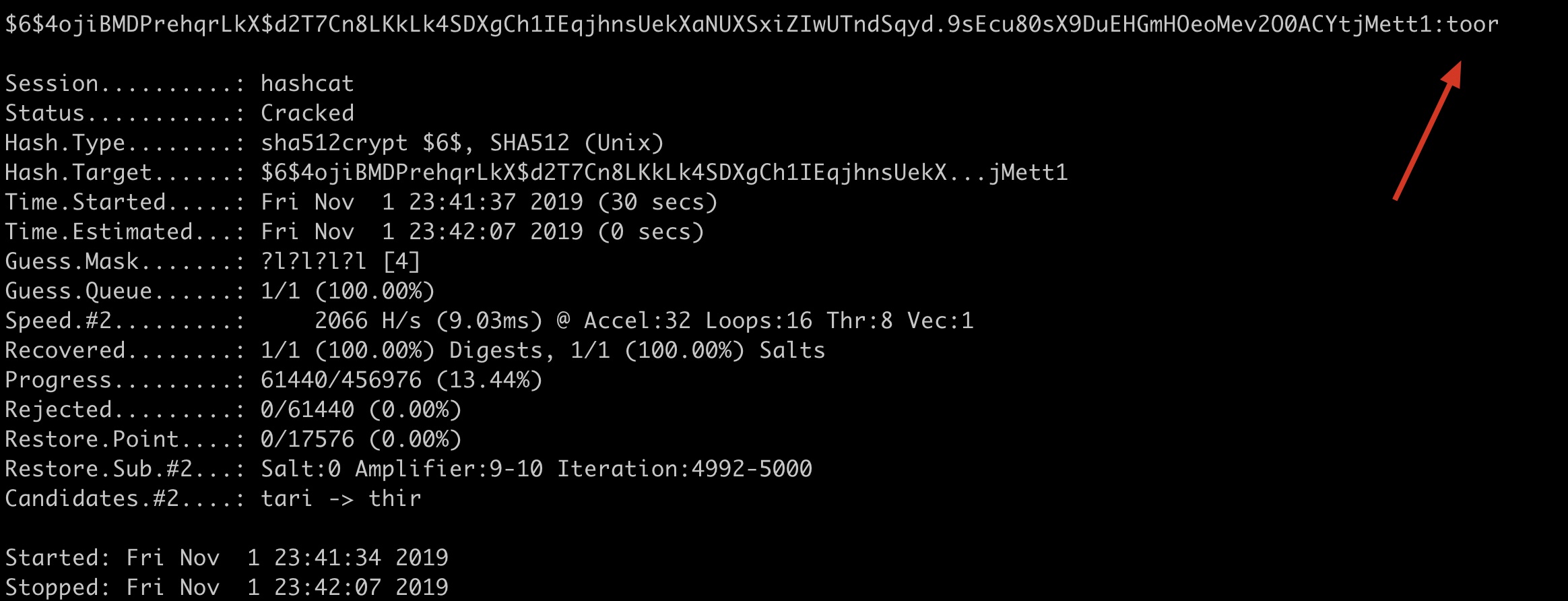
root@kali-linux:~# cat /etc/shadowroot:$6$4ojiBMDPrehqrLkX$d2T7Cn8LKkLk4SDXgCh1IEqjhnsUekXaNUXSxiZIwUTndSqyd.9sEcu80sX9DuEHGmHOeoMev2O0ACYtjMett1:18201:0:99999:7::: daemon:*:18024:0:99999:7::: bin:*:18024:0:99999:7::: sys:*:18024:0:99999:7::: sync:*:18024:0:99999:7::: games:*:18024:0:99999:7::: man:*:18024:0:99999:7::: lp:*:18024:0:99999:7::: mail:*:18024:0:99999:7::: news:*:18024:0:99999:7::: uucp:*:18024:0:99999:7::: proxy:*:18024:0:99999:7::: www data:*:18024:0:99999:7::: backup:*:18024:0:99999:7::: list:*:18024:0:99999:7::: irc:*:18024:0:99999:7::: gnats:*:18024:0:99999:7::: nobody:*:18024:0:99999:7::: _apt:*:18024:0:99999:7::: systemd-timesync:*:18024:0:99999:7::: systemd-network:*:18024:0:99999:7::: systemd-resolve:*:18024:0:99999:7::: mysql:!: 18024:0:99999:7::: ntp:*:18024:0:99999:7::: messagebus:*:18024:0:99999:7::: arpwatch:!: 18024:0:99999:7::: Debian-exim:!: 18024:0:99999:7::: uuidd:*:18024:0:99999:7::: Red Socks:!: 18024:0:99999:7::: tss:*:18024:0:99999:7::: rwhod:*:18024:0:99999:7::: iodine:*:18024:0:99999:7::: miredo:*:18024:0:99999:7::: DNSMask:*:18024:0:99999:7::: postgres:*:18024:0:99999:7::: usbmux:*:18024:0:99999:7::: rtkit:*:18024:0:99999:7::: stunnel4:!: 18024:0:99999:7::: sshd:*:18024:0:99999:7::: Debian-snmp:!: 18024:0:99999:7::: Shhh:!: 18024:0:99999:7::: pulse:*:18024:0:99999:7::: speech dispatcher:!: 18024:0:99999:7::: Open:*:18024:0:99999:7::: saned:*:18024:0:99999:7::: I laughed:*:18024:0:99999:7::: colord:*:18024:0:99999:7::: geoclue:*:18024:0:99999:7::: king-phisher:*:18024:0:99999:7::: Debian-gdm:*:18024:0:99999:7::: dradis:*:18024:0:99999:7::: beef-xss:*:18024:0:99999:7::: systemd-coredump:!!: 18082:As you can see, root has a password. The previous one was $6 . The encryption method for the surface hash is: sha512crypt $6$, SHA512 (Unix).
bash
# Mask to crack root password Do not record successfully cracked hash in potfile Specify device 2 (kernel graphics) to run password and enable optimization hashcat -a 3 -m 1800 --force '$6$4ojiBMDPrehqrLkX$d2T7Cn8LKkLk4SDXgCh1IEqjhnsUekXaNUXSxiZIwUTndSqyd.9sEcu80sX9DuEHGmHOeoMev2O0ACYtjMett1' '? l? l? l? l' -O -d 2 --potfile-disable# Mask to crack root password Ignore username Do not record successfully cracked hash in potfile Specify device 2 (kernel graphics) to run password and enable optimization hashcat -A 3 -m 1800 --force 'root:$6$4ojiBMDPrehqrLkX$d2T7Cn8LKkLk4SDXgCh1IEqjhnsUekXaNUXSxiZIwUTndSqyd.9sEcu80sX9DuEHGmHOeoMev2O0ACYtjMett1' '? l? l? l? l' -O -d 2 --username --potfile-disableThe built-in CPU and dedicated graphics card under macOS could not be cracked. Here, Guoguang himself manually switched between -d 2 and used kernel graphics to successfully run it:
Dictionary cracking Windows LM Hash
bash
hashcat -a 0 -m 3000 --force '921988ba001dc8e14a3b108f3fa6cb6d' password.txtdictionary cracking Windows NTLM Hash
bash
hashcat -a 0 -m 1000 --force 'e19ccf75ee54e06b06a5907af13cef42' password.txtdistributed cracking
| parameters | type | description | understanding of Kunikuang | example |
|---|---|---|---|---|
| –brain-server | Enable brain server | Enable master server | ||
| -z, –brain-client | Enable brain client, activates -S | Enable distributed client | ||
| –brain-client-features | Num | Define brain client features, see below | Define client functionality | –brain-client-features=3 |
| –brain-host | Str | Brain server host (IP or domain) | IP or domain of the primary server | –brain-host=127.0.0.1 |
| –brain-port | port | brain server port | Primary server port | – brain-port=13743 |
| – brain-password | Str | Brain server authentication password | Primary server authentication password | –brain-password=e8acfc7280c48009 |
| –brain-session | Hex | Overrides automatically calculated brain session | Automatically overwrite already computed primary session | –brain-session=0x2ae611db |
| –brain-session-whitelist | Hex | Allow given sessions only, separated with commas | Allow only given sessions, separated by commas | – brain-session-whitelist=0x2ae611db |
Client Features
bash
- [ Brain Client Features ] -  # | Features
 ===+========
  1 | Send hashed passwords                       # Send cracked password
  2 | Send attack positions                       # Send compromised positions
  3 | Send hashed passwords and attack positions  # Send cracked passwords and cracked locations